
Documentation Index
Fetch the complete documentation index at: https://staff.help.haunt.gg/llms.txt
Use this file to discover all available pages before exploring further.
Basic Ticket Handling
When a ticket is opened, staff will be pinged automatically. A message will be sent containing all information the user provided in the modal. If the user has linked their haunt.gg account to the bot, their UID, username and banned status will also be displayed. This message also includes three buttons:- Claim Ticket, Close Ticket, and Delete Ticket.
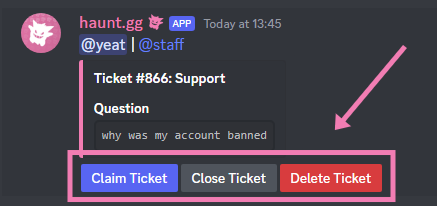
All of these actions can also be done with /ticket [claim/close/delete].
- Claim Ticket → Prevents other staff from sending messages in the ticket channel. (Managers & Owners can always send messages, even if claimed)
- Close Ticket → Makes the ticket invisible to the user but keeps it open for staff.
- Delete Ticket → Deletes the ticket with an optional reason.
#ticket-logs.
Move to Management
If a ticket cannot be handled by staff and requires management assistance (e.g. API key requests), move it with/ticket move.
Other Ticket Commands
/ticket reopen→ Reopens a closed ticket/ticket remind→ Reminds a user via DM to respond to their ticket/ticket unclaim→ Unclaims the ticket (if claimed)/ticket add→ Adds another user to the ticket/ticket remove→ Removes a user from the ticket/ticket userstats→ Shows user stats (e.g. closed tickets, average stars)/ticket stats→ Shows overall server ticket stats/ticket info→ Show information about a ticket/ticket list→ List all tickets for a user